Configure Process Widget
The process widget displays a list of available processes with four different display modes: compact (process list), combined (process with tasks/cases), full (process details), and image (process with visual representation). Each mode provides different levels of detail and interaction.
Define Process Widget
The process widget displays processes in one of four modes. Refer to Process List Widget for widget behavior details.
Configuration Example
The basic structure of the JSON of a process widget is as follows:
{
   "type": "compact-process",
   "id": "process-widget",
   "names": [
      {
         "locale": "en",
         "value": "Process Widget"
      },
      {
         "locale": "de",
         "value": "Prozess-Widget"
      }
   ],
   "layout": {
      "x": 0,
      "y": 0,
      "w": 4,
      "h": 6
   },
   "showFullscreenMode": true,
   "showWidgetInfo": true
}
JSON Configuration Reference
Required Properties
Property |
Type |
Description |
|---|---|---|
|
string |
Widget type. Options: |
|
string |
Unique identifier for the widget |
|
array |
Multilingual display names. Each entry: |
|
object |
Widget position and size (see Layout Properties below) |
Layout Properties
Property |
Type |
Description |
|---|---|---|
|
number |
Column position in 12-column grid (0-11). CSS left = |
|
number |
Row position. CSS top = |
|
number |
Width in grid columns (1-12). Pixel width = |
|
number |
Height in grid rows (min 4). Pixel height = |
|
string |
(Optional) CSS classes for custom styling |
|
string |
(Optional) Inline CSS styles |
Display Properties
Property |
Type |
Default |
Description |
|---|---|---|---|
|
boolean |
|
Show/hide fullscreen mode icon |
|
boolean |
|
Show/hide widget information icon |
Process Widget Types
The type property determines the display mode:
compact-process- Compact list of processes with icons and namescombined-process- Single process with its related tasks and casesfull-process- Detailed view of a single processimage-process- Visual representation of a single process with image
Each mode has specific configuration requirements. Refer to the sections below for mode-specific properties.
Compact Mode
Compact mode displays a list of processes with icons and names, ideal for showing multiple processes in a compact space.
Configuration Example
Below is a standard JSON definition of a Process widget in compact mode:
{
   "type": "compact-process",
   "id": "compact-process-widget",
   "names": [
      {
         "locale": "en",
         "value": "Available Processes"
      },
      {
         "locale": "de",
         "value": "Verfügbare Prozesse"
      }
   ],
   "layout": {
      "x": 0,
      "y": 0,
      "w": 4,
      "h": 6
   },
   "processPaths": [
      "designer/portal-developer-examples/Start Processes/Request/createNewRequest.ivp",
      "designer/portal-developer-examples/Start Processes/Request/collectDataRequest.ivp"
   ],
   "categories": ["/Categories/Showcase/Customized", "/Categories/Showcase/PortalDialogExample"],
   "sorting": "SORTING_INDEX",
   "enableQuickSearch": true,
   "showFullscreenMode": true,
   "showWidgetInfo": true
}
Compact Mode Properties
Property |
Type |
Default |
Description |
|---|---|---|---|
|
array |
(all processes) |
IWebStartable identifiers of specific processes to display |
|
array |
(all processes) |
CMS URI of process categories. Shows all processes in these categories |
|
string |
|
Sort order: |
|
boolean |
|
Enable quick search textbox for process names |
Note
If both
processPathsandcategoriesare defined,processPathstakes precedenceIf neither is defined, all available processes are displayed
For
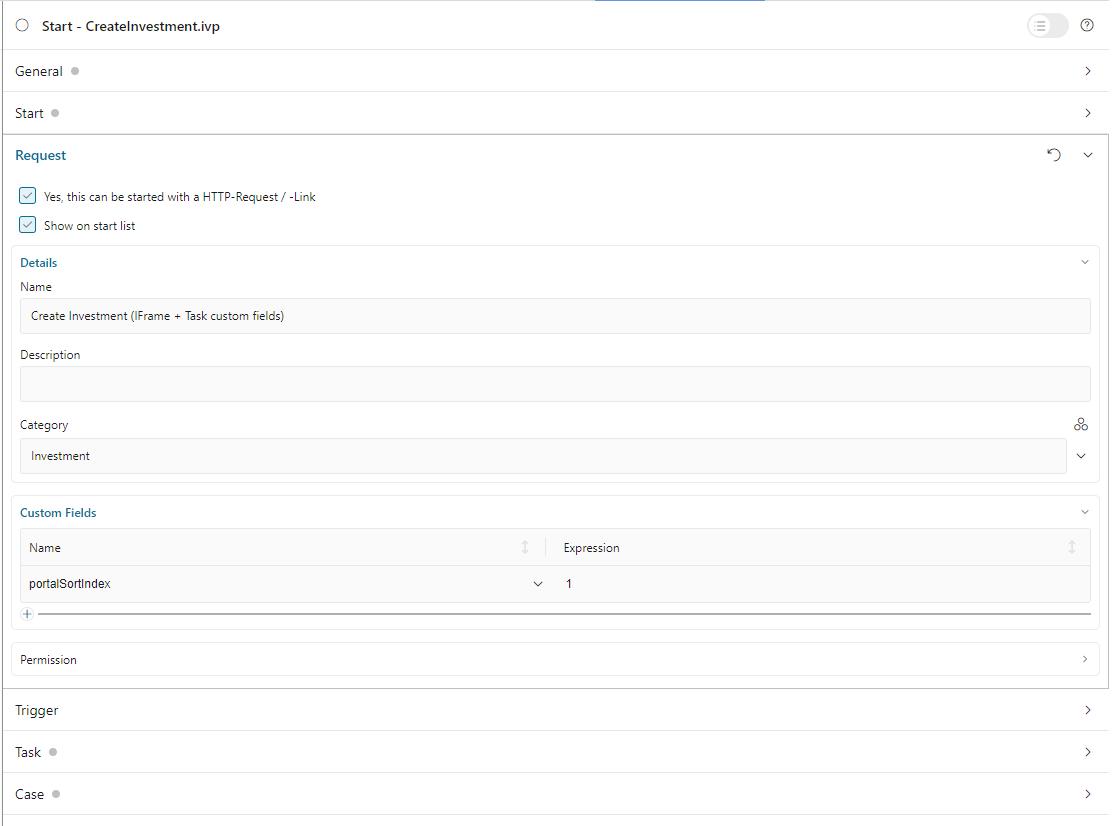
SORTING_INDEXmode, define custom fieldportalSortIndexwith numeric value in process start
Tip
Recommended compact mode size: Width 3-5 columns, Height 5-8 rows for optimal process list display.
Combined Mode
Combined mode displays a single process along with its related tasks and cases, providing a comprehensive view of process execution status.
Configuration Example
Below is a standard JSON definition of a Process widget in combined mode:
{
   "type": "combined-process",
   "id": "combined-process-widget",
   "names": [
      {
         "locale": "en",
         "value": "Payment Process Overview"
      },
      {
         "locale": "de",
         "value": "Zahlungsprozess-Übersicht"
      }
   ],
   "layout": {
      "x": 0,
      "y": 0,
      "w": 8,
      "h": 9
   },
   "processPath": "designer/portal-developer-examples/Start Processes/CreateTestData/createNewPayment.ivp",
   "rowsPerPage": 5,
   "showFullscreenMode": true,
   "showWidgetInfo": true
}
Combined Mode Properties
Property |
Type |
Default |
Description |
|---|---|---|---|
|
string |
(required) |
IWebStartable identifier of the process to display with its tasks/cases |
|
number |
|
Number of tasks/cases displayed per page |
Tip
Recommended combined mode size: Width 6-12 columns, Height 8-12 rows to accommodate process details and related items.
Full mode
Full mode displays detailed information about a single process, including description, start options, and metadata.
Configuration Example
Below is a standard JSON definition of a Process widget in full mode:
{
   "type": "full-process",
   "id": "full-process-widget",
   "names": [
      {
         "locale": "en",
         "value": "Process Details"
      },
      {
         "locale": "de",
         "value": "Prozessdetails"
      }
   ],
   "layout": {
      "x": 0,
      "y": 0,
      "w": 6,
      "h": 8
   },
   "processPath": "designer/portal-developer-examples/Start Processes/CreateTestData/createNewPayment.ivp",
   "showFullscreenMode": true,
   "showWidgetInfo": true
}
Full Mode Properties
Property |
Type |
Description |
|---|---|---|
|
string |
IWebStartable identifier of the process to display in detail |
Tip
Recommended full mode size: Width 5-8 columns, Height 6-10 rows for complete process information display.
Image Mode
Image mode displays a process with its associated image/icon, providing a visual representation alongside process information.
Configuration Example
Below is a standard JSON definition of the Process widget in image mode:
{
   "type": "image-process",
   "id": "image-process-widget",
   "names": [
      {
         "locale": "en",
         "value": "Featured Process"
      },
      {
         "locale": "de",
         "value": "Ausgewählter Prozess"
      }
   ],
   "layout": {
      "x": 0,
      "y": 0,
      "w": 4,
      "h": 6
   },
   "processPath": "designer/portal-developer-examples/Start Processes/CreateTestData/createNewPayment.ivp",
   "showFullscreenMode": true,
   "showWidgetInfo": true
}
Image Mode Properties
Property |
Type |
Description |
|---|---|---|
|
string |
IWebStartable identifier of the process to display with its image |
Tip
Recommended image mode size: Width 3-5 columns, Height 4-7 rows for optimal process image and info display.
Note
The process image is configured in the process properties within the Axon Ivy Designer.