Architecture
Important
The CSS styles, Java methods, etc. that are not explicitly documented are internal to the Portal. Do not rely on them, as they may change in future versions. Only use documented APIs, components, and customization points to ensure compatibility with future Portal releases.
Overview
Portal provides a modular architecture designed for flexibility, maintainability, and upgrade safety. Understanding Portal’s structure and how it integrates with your applications is essential for successful implementation, customization, and long-term maintenance.
Architecture Principles:
Separation of Concerns: Portal provides the workbench, your apps provide business logic
Shared Components: Reuse Portal UI components across all your applications
Configuration Over Code: Customize through settings rather than code modifications
Iframe Isolation: Your processes run independently while maintaining Portal integration
Key Concepts for Developers:
Security Context: The Portal and Projects using it should be deployed in different applications but in the same security context for task/case visibility
Component Reuse: Import portal-components into your apps to use Portal’s UI components
Public API: Use documented APIs and customization points only
Related Sections:
Installation - Set up Portal in development
Deployment - Deploy Portal to production
Customization - Extend Portal functionality
IFrame Integration - Embed processes in Portal
Deployment Strategy
You can deploy Portal in two ways:
Single Application (Simple Setup)
Portal and your projects in one application
Acceptable for simple setups or prototyping
More complex upgrades and migrations
Multi-Application (Recommended)
Portal and your projects in separate applications
Same security context required
Easier upgrades and maintenance
Better separation of concerns
Tip
We strongly recommend the multi-application setup for production environments.
The Portal Multi-Application Setup
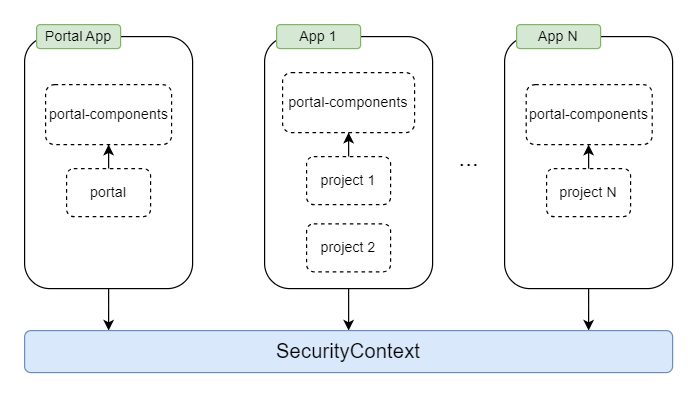
The recommended deployment architecture separates Portal from your custom applications while keeping them in the same security context.
Deployment Structure:
Application 1: Portal + portal-components (Portal application)
Application 2: Your custom project + portal-components (Your application)
Both applications depend on portal-components to reuse Portal UI components, but only Application 1 contains the Portal core functionality.
Key Benefits:
Independent Upgrades: Update Portal without affecting your applications
Clear Boundaries: Separate Portal functionality from business logic
Easier Maintenance: Troubleshoot and maintain components independently
Better Testing: Test Portal updates in isolation before deployment
Warning
Run only one Portal per security context. Multiple Portal instances in the same security context are not supported.
Portal Module Structure
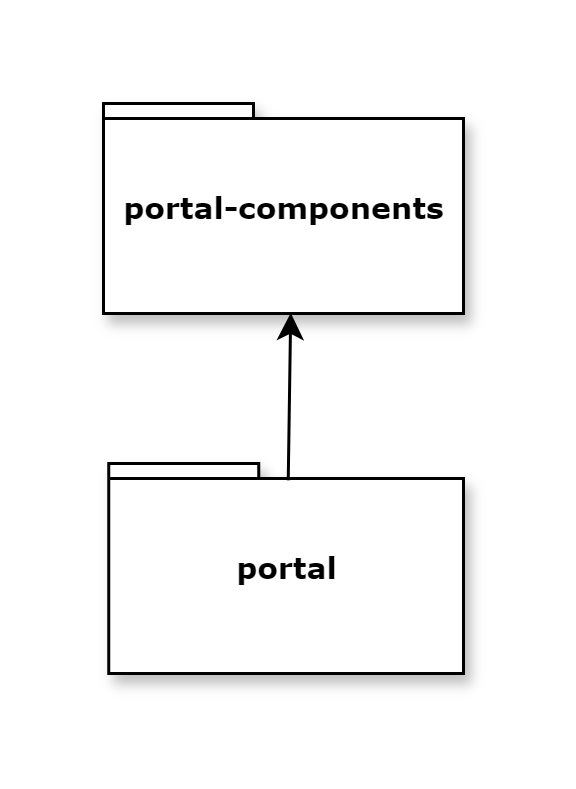
The Portal application consists of two main modules:
Module |
Type |
Purpose |
|---|---|---|
portal-components |
Public components and APIs |
Reusable UI components for any app |
portal |
Portal-specific implementation |
Portal UI, templates, and pages |
portal-components
Public UI Components and APIs
This module provides reusable components that are independent of the Portal core:
Available Components:
User Selection: Choose users from the system
Role Selection: Select roles and permissions
Document Table: Display and manage documents
Process Chain: Visualize process relationships
Process Viewer: View process flow diagrams
Security Member Name and Avatar: Display user information
Key Characteristics:
Independent of Portal implementation
Can be used in any Axon Ivy application
Provides public Java APIs
Supports Freya and Serenity themes
Tip
Use portal-components in your custom applications to maintain consistent UI patterns.
portal
Portal-Specific Implementation
This module contains Portal’s core functionality:
Included Features:
Portal UI Components: Specialized components for Portal pages
Portal Templates: HTML Dialog templates for developers
Portal Pages: Task lists, case lists, dashboards, process lists
Navigation Menus: Top menu, application menu, user menu
Admin Features: Settings, configuration, user management
Template Features:
Consistent navigation across Portal and custom processes
Automatic handling of Portal context
Integration with Portal security
Standardized look and feel
Note
Portal templates allow your custom processes to seamlessly integrate with the Portal user experience.
Security Integration
Portal integrates with Axon Ivy’s security system to provide authentication, authorization, and permission-based access control across all Portal features.
Security Architecture:
Portal leverages Ivy’s built-in security infrastructure and extends it with Portal-specific permissions:
Authentication & Authorization: Portal uses Ivy’s security system for user authentication and role-based authorization
Shared Security Context: All applications within the same security context share users, roles, and sessions
Extended Permissions: Portal adds specific permissions for dashboard management, task operations, case handling, and administrative functions
Permission Groups: Portal organizes permissions into logical groups (General, Task, Case, Absence/Substitute, Statistics)
Multi-Application Security:
In a multi-app deployment, security works across applications:
Users authenticate once and access Portal and custom apps
Permissions granted in one app apply to all apps in the same security context
Portal displays tasks and cases from all applications based on user permissions
Custom apps inherit Portal’s security templates when using Portal components
Key Security Features:
Feature |
Description |
|---|---|
Role-Based Access |
Control Portal features by assigning permissions to roles |
Portal Permissions |
Additional permissions for Portal-specific features (dashboards, widgets, process lists) |
Security Members |
Support for users, roles, and groups in permission configuration |
Permission Inheritance |
Child roles inherit permissions from parent roles |
External Security Systems |
Compatible with LDAP, Active Directory, and custom security providers |
Tip
For detailed permission configuration and management, refer to the Portal User Guide’s security and admin settings sections.
Warning
All applications using Portal must be in the same security context. Cross-context access is not supported.
Integration with Custom Applications
How Portal Works with Your Applications:
Separate Deployment: Deploy Portal and your apps as separate applications
Shared Security Context: Both applications share the same security context for unified authentication and authorization
Add Portal Dependency: To use Portal components in your custom application, add portal-components as a project dependency in your
pom.xmlPortal Components: Import and use Portal UI components in your dialogs and pages
Portal Templates: Use Portal’s HTML Dialog templates in your processes
Public APIs: Call Portal APIs from your code (navigation, task management, etc.)
Process Integration: Start your processes from Portal’s process list or custom dashboards
Communication Flow:
Portal displays tasks from all applications in the same security context
Your processes can use Portal templates for consistent UI
Portal components can be embedded in your custom pages
Both applications share user sessions and permissions