Configure External Page Widget
The external page widget embeds external webpages into the Portal dashboard using iframes. This enables users to interact with multiple systems (e.g., monitoring tools, analytics dashboards, documentation sites) directly from the Portal without switching applications.
Warning
Some external websites block iframe embedding through security policies (X-Frame-Options, CSP). Verify the target website allows embedding before configuration.
Define An External Page Widget
The external page widget displays an external URL within the dashboard.
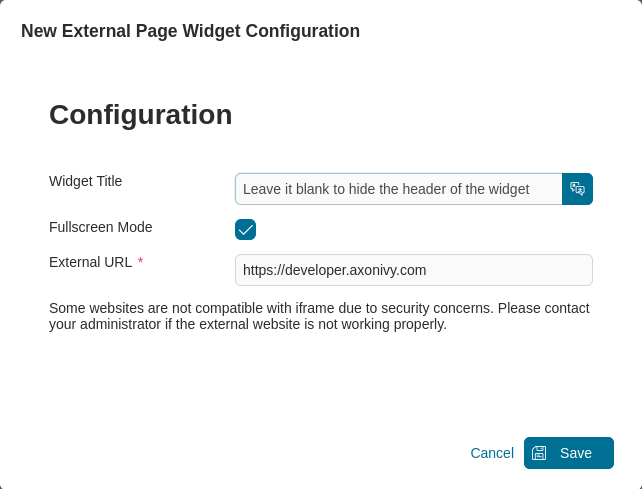
Configuration Dialog
Widget title: Widget display name. Leave blank to hide the widget header.
External URL: Full URL of the external webpage to embed (e.g.,https://www.example.com).
showFullscreenMode: Show/hide fullscreen mode icon. Default istrue.
Define An External Page Widget Using JSON
Configuration Example
The JSON structure for an external page widget:
{
   "type": "custom",
   "id": "external-page-widget",
   "showFullscreenMode": true,
   "names": [
      {
         "locale": "en",
         "value": "Axon Ivy Website"
      },
      {
         "locale": "de",
         "value": "Axon Ivy Webseite"
      }
   ],
   "layout": {
      "x": 0,
      "y": 0,
      "w": 8,
      "h": 10
   },
   "data": {
      "url": "https://www.axonivy.com/"
   }
}
JSON Configuration Reference
Required Properties
Property |
Type |
Description |
|---|---|---|
|
string |
Widget type. Must be |
|
string |
Unique identifier for the widget |
|
array |
Multilingual display names. Each entry: |
|
object |
Widget position and size (see Layout Properties below) |
|
object |
Must contain |
Layout Properties
Property |
Type |
Description |
|---|---|---|
|
number |
Column position in 12-column grid (0-11). CSS left = |
|
number |
Row position. CSS top = |
|
number |
Width in grid columns (1-12). Pixel width = |
|
number |
Height in grid rows (min 6). Pixel height = |
Tip
Recommended external page widget size: Width 6-12 columns, Height 8-12 rows for optimal external content display.
Display Properties
Property |
Type |
Default |
Description |
|---|---|---|---|
|
boolean |
|
Show/hide fullscreen mode icon |
Data Properties
Property |
Type |
Description |
|---|---|---|
|
string |
Full URL of the external webpage to embed (must start with |
Important
Ensure the external URL’s server allows iframe embedding. Check the website’s X-Frame-Options and Content-Security-Policy headers.