Task Delegation
To customize the list of users and roles a task can be delegated to, create a callable subprocess with:
Signature: portalCalculateTaskDelegate
Parameters
roles(java.util.List<com.axonivy.portal.components.dto.RoleDTO>)List of roles that can be delegated to. Modify this list to create your custom delegate list.
users(java.util.List<com.axonivy.portal.components.dto.UserDTO>)List of users that can be delegated to. Filter this list rather than creating a new one for better performance.
currentUser(com.axonivy.portal.components.dto.SecurityMemberDTO)The user performing the delegation.
task(ch.ivyteam.ivy.workflow.ITask)The task being delegated.
Result
status(java.lang.String)Operation status:
OKorSKIP. Set toSKIPto exclude this subprocess result from the combined delegate list.roles(java.util.List<com.axonivy.portal.components.dto.RoleDTO>)Filtered list of roles that can be delegated to.
users(java.util.List<com.axonivy.portal.components.dto.UserDTO>)Filtered list of users that can be delegated to.
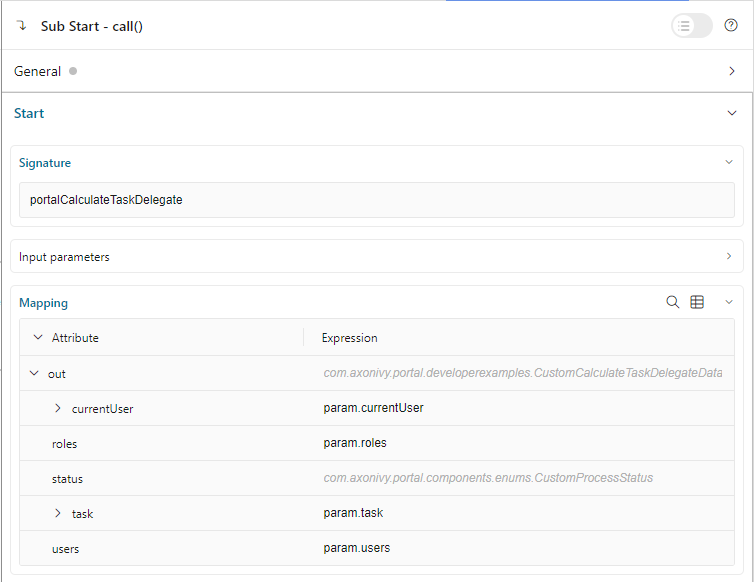
The parameters of the callable subprocess data contain the
currentUser and the current task to be delegated.
Get the users and roles to which the task can be delegated to from
the lists users and roles. Modify these lists to create
your delegate list.
Portal will call subprocesses with the details above and then combine all
roles and users from the results into a list of roles and users the task can be delegated to.
To skip the result of one callable subprocess, please set the result variable status to "SKIP".
Tip
Portal provides the standard users list together with their roles as a parameter for the callable.
Please filter the users list instead of creating a new user list as this is more performant.
In case you want to filter specific users by some roles, please use the method getRoles() of each user.