Menu And Default Homepage In User Profile
Introduction
Portal’s menu system enables you to extend the default navigation with custom menu items that trigger Ivy processes or open external links. You can control menu visibility through permissions and allow users to set custom process pages as their default homepage, creating personalized navigation experiences that align with specific user roles and workflows.
Default Menu Items:
The Portal main menu has four default items: Dashboard, Processes, Tasks, and Cases.
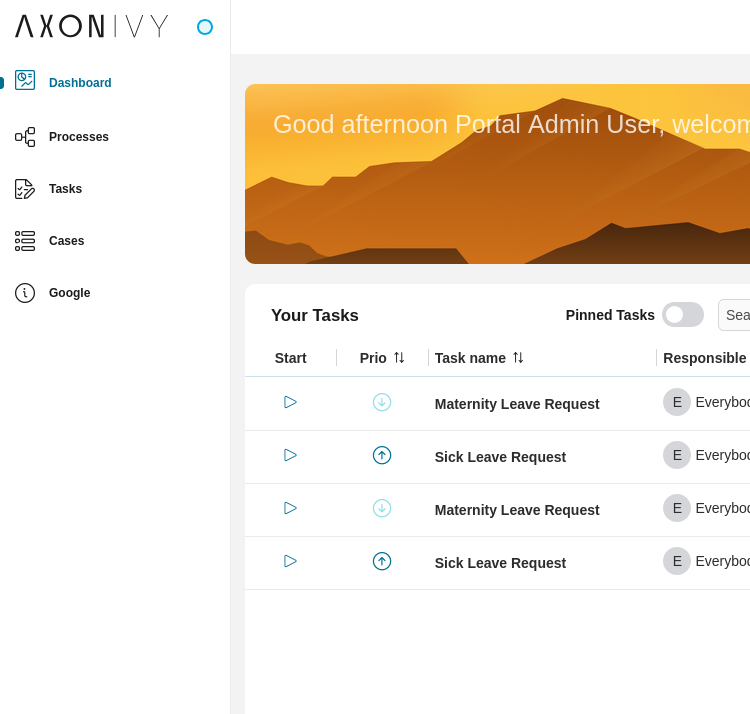
Customization Options:
Add custom menu items (Ivy processes, external links, or dashboards)
Hide default menu items using Portal permissions
Set menu item order using index values
Configure default homepage for user profiles
All menu items except external links can be set as the user profile’s default homepage.
Custom menu items
Menu type
There are two types of custom menu items:
Ivy process: triggers an Ivy process when clicked. Can be set as the default homepage in a user’s profile.
External link: opens an external link in a new tab. Cannot be set as the default homepage in a user’s profile.
The Ivy process is the default custom menu item type. To change custom menu item type to external link, set the isExternalLink attribute to true.
Menu index
You can find the custom menu items below the default menu items.
To set the order of custom menu items, assign a number to the index attribute. The item will be displayed based on the given index.
If custom menu items are not indexed, they will be sorted alphabetically.
Add custom menu items
There are two ways to add custom menu items in Portal. Please refer to the following sections for more information.
Callable subprocess
To add custom menu items, create a callable subprocess with:
Signature: portalLoadSubMenuItems
Result:
subMenuItems(java.util.List<com.axonivy.portal.components.configuration.CustomSubMenuItem>)List of custom menu items to add to the Portal main menu.
Example of a menu that redirects to an Ivy process.
import com.axonivy.portal.components.configuration.CustomSubMenuItem; import com.axonivy.portal.components.publicapi.ProcessStartAPI; import org.apache.commons.lang3.StringUtils; String userExampleGuideLink = ProcessStartAPI. findStartableLinkByUserFriendlyRequestPath("Start Processes/UserExampleGuide/userExampleGuide.ivp"); if (!StringUtils.isEmpty(userExampleGuideLink)) { CustomSubMenuItem userExampleGuide = new CustomSubMenuItem(); userExampleGuide.setIcon("si si-bulb"); userExampleGuide.setLabel("User example guide"); userExampleGuide.setLink(userExampleGuideLink + "?embedInFrame"); userExampleGuide.setIndex(0); in.subMenuItems.add(userExampleGuide); }
Example of an external link:
import com.axonivy.portal.components.publicapi.ApplicationMultiLanguageAPI; import com.axonivy.portal.components.configuration.CustomSubMenuItem; import com.axonivy.portal.components.publicapi.ProcessStartAPI; import org.apache.commons.lang3.StringUtils; CustomSubMenuItem google = new CustomSubMenuItem(); google.setIcon("si si-information-circle"); google.setLabel(ApplicationMultiLanguageAPI.getCmsValueByUserLocale("/Processes/google")); google.setLink("www.google.com"); google.setIsExternalLink(true); google.setIndex(1); in.subMenuItems.add(google);
Tip
Refer to process CustomLoadSubMenuItems in project portal-developer-examples
for an example of how to create custom menu items.
Tip
ApplicationMultiLanguageAPI.getCmsValueByUserLocale method.subMenuItem.setLabel(ApplicationMultiLanguageAPI.getCmsValueByUserLocale<CMS_URI>));Portal variable
Besides the callable subprocess approach, you can also define custom menu items in the Portal variable
Portal.CustomMenuItems.
Here’s an example of custom menu items in the Portal.CustomMenuItems variable.
[ { "index": 0, "link": "https://your_external_page.com", "label": "External link", "isExternal": "true", "icon": "si si-bulb", "version": "11.2.0" }, { "index": 1, "link": "/designer/pro/portal-user-examples/17236DB1D3DA14C0/userExampleGuide.ivp", "label": "Guideline Ivy process", "isExternal": "false", "version": "11.2.0" } ]
The basic JSON structure of a custom menu item
index: index of the menu item on the main menu.
link: link of the menu item. You can set a user-friendly request path or a process ID for an Ivy process.
label: label of the menu item.
isExternal: set totrueto mark this custom menu item as an external link.
version: version of the menu.
Hide default menu items
You can hide three default menu items: Processes, Tasks and Cases from the main menu by using Portal permissions.