Hide Technical Stuff
Introduction
The Hide Technical Stuff customization allows you to prevent technical roles, tasks, and cases from appearing in Portal’s user interface. By marking entities as technical, you can clean up views and delegation screens, hiding system-level workflows and administrative roles from end users while maintaining their functionality in the background.
Depending on the value of Ivy variable PortalHiddenTaskCaseExcluded, hidden
tasks and cases are shown (FALSE) or hidden (TRUE). Default value is TRUE.
Hide Technical Roles
A technical role is not displayed anywhere (e.g. in delegation or absence
management). AXONIVY_PORTAL_ADMIN is a technical role by default.
To mark a role as a technical role, set the HIDE property with any
value on the role.
Use the utility method of Portal
- Set property:
com.axonivy.portal.components.publicapi.RoleAPI.setProperty([YOUR_ROLE], ch.ivy.addon.portalkit.enums.AdditionalProperty.HIDE.toString(), “HIDE”)
- Reverse it:
com.axonivy.portal.components.publicapi.RoleAPI.removeProperty([YOUR_ROLE], ch.ivy.addon.portalkit.enums.AdditionalProperty.HIDE.toString())
Hide Technical Tasks
A technical task is not displayed in any task lists of Portal.
To mark a task as a technical task, follow one of the two ways below:
Use the utility methods of the Portal TaskAPI
If your project depends on portal-components
- Set task as technical:
com.axonivy.portal.components.publicapi.TaskAPI.setHidePropertyToHideInPortal(ITask)
- Reverse it:
com.axonivy.portal.components.publicapi.TaskAPI.removeHidePropertyToDisplayInPortal(ITask)
Use the customfields of the ITask API
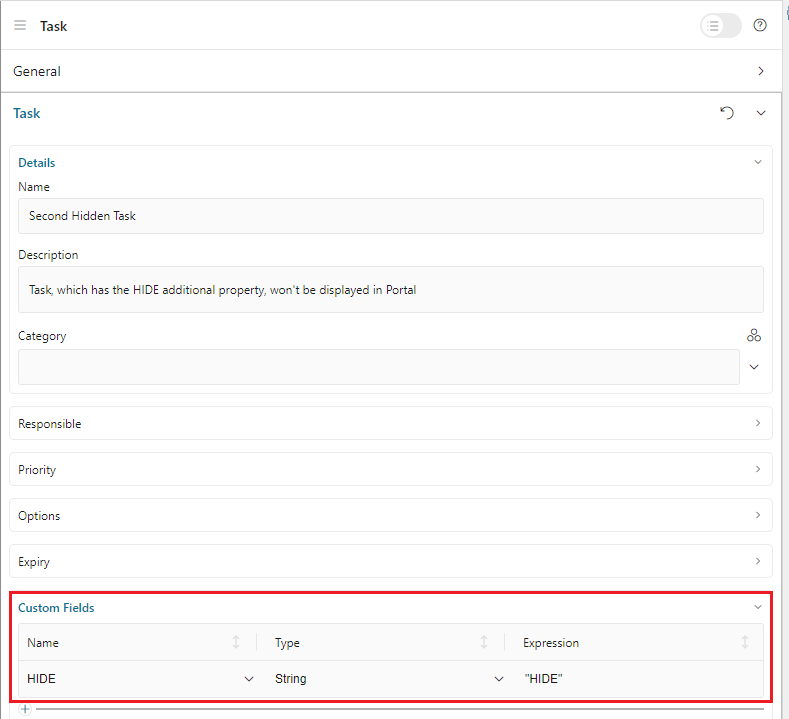
Open the task editor, expand the Custom Fields section
- Set task as technical:
Define a
STRINGfield with the nameHIDE. Set value toHIDE
- Reverse it:
Remove the custom
STRINGfield namedHIDE
Hide Technical Cases
A technical case is not displayed in any case lists of Portal.
Tasks belonging to a technical case are considered technical tasks and should be hidden as well.
To mark a case as a technical case, follow one of the two ways below:
Use the utility methods of the Portal CaseAPI
If your project depends on portal-components
- Set case as technical:
com.axonivy.portal.components.publicapi.CaseAPI.setHidePropertyToHideInPortal(ICase)
- Reverse it:
com.axonivy.portal.components.publicapi.CaseAPI.removeHidePropertyToDisplayInPortal(ICase)
Use the customfields of the ICase API
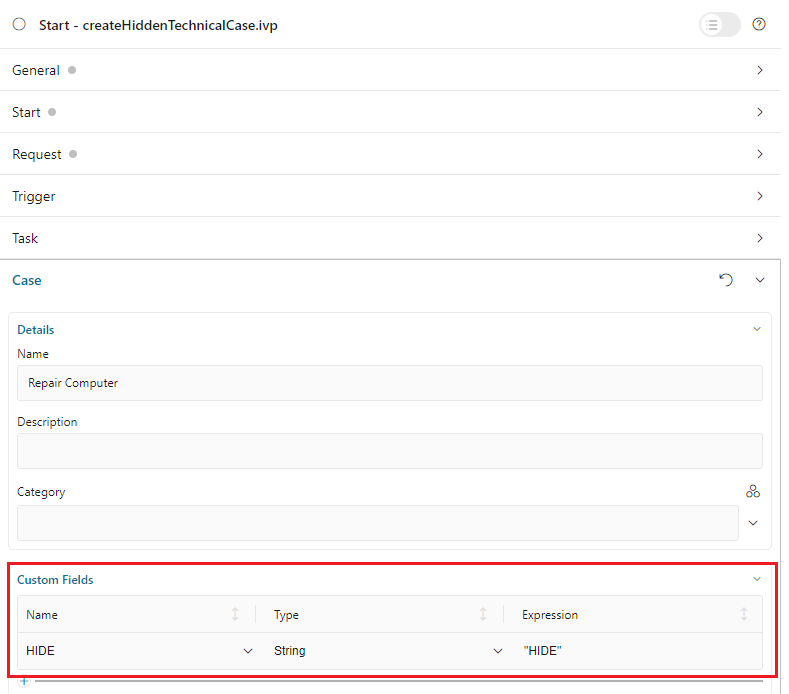
Open the case editor, expand the Custom Fields section
- Set case as technical:
Define a
STRINGfield with the nameHIDE. Set value toHIDE
- Reverse it:
Remove the custom
STRINGfield namedHIDE