User Menu
Introduction
The user menu can be customized to include additional items beyond the Portal’s default entries. Custom items support two types of actions:
Configuration:
Custom user menu items are defined using the Portal.UserMenu variable.
Menu item identifiers
Display titles (single or multilingual)
User/role permissions for visibility
Target URLs (external or process links)
Process parameters (for Ivy process starts)
Define Your Own User Menu
Portal supports multiple configurable user menu items that display below the default entries (Profile, Admin Settings, Logout, etc.).
HowTo: Configure Custom User Menu Items
Navigate to Engine Cockpit > Configuration > Variables
Find or create the Portal.UserMenu variable
Define your menu items using JSON configuration (see example below)
Save the configuration
Custom menu items appear immediately in the user menu
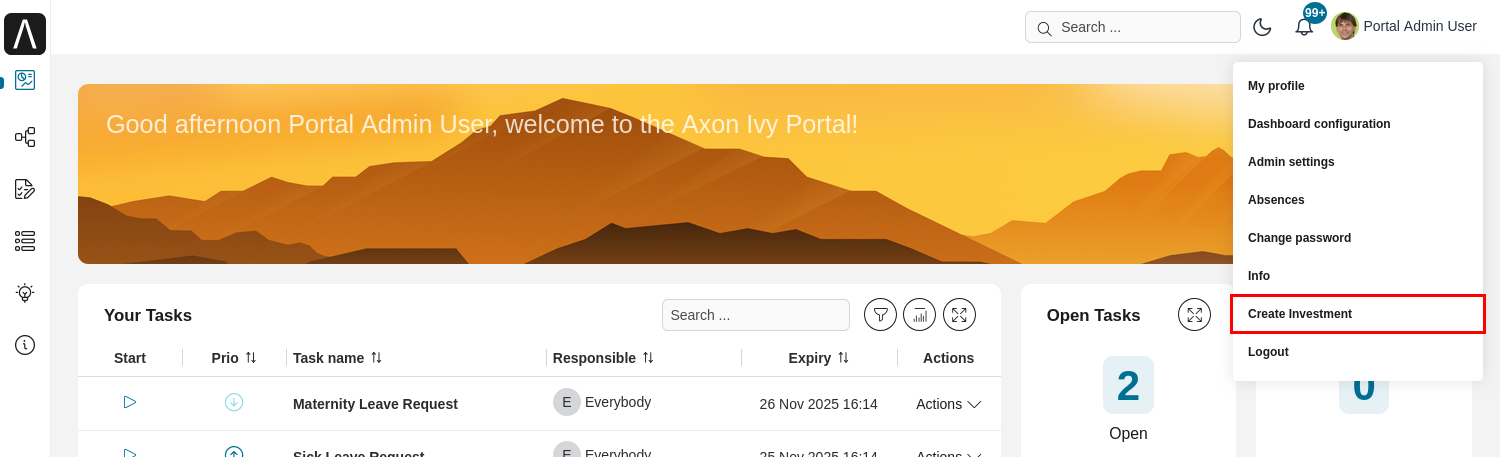
Configuration Example:
Below is a comprehensive JSON example showing both external link and Ivy process configurations:
[
    {
        "id" : "axon-ivy",
        "title" : "Axon Ivy",
        "permissions": ["#demo"],
        "url" : "https://www.axonivy.com/"
    },
    {
        "id" : "re-order-dashboard",
        "titles": [
            {
                "locale": "en",
                "value": "Reorder your dashboards"
            },
            {
                "locale": "de",
                "value": "Dashboards neu anordnen"
            }
        ],
        "permissions": ["Employee", "AXONIVY_PORTAL_ADMIN", "#daniel"],
        "url": "Start Processes/ExamplePortalStart/DashboardReorder.ivp",
        "params": {
            "isPublicDashboard":"false"
        }
    }
]
JSON Configuration Reference
Each user menu item in the JSON array supports the following properties:
Properties:
id(string)Unique identifier for the menu item
Must be unique across all menu items
Used internally for tracking and configuration
title(string)Single-language title displayed for all users
Simple option for single-language deployments
Example:
"title": "Company Intranet"titles(array)Multilingual titles for different locales
Each entry contains
locale(language code) andvalue(translated text)Portal displays title matching user’s language preference
Falls back to first entry if user’s locale not found
Example:
"titles": [ {"locale": "en", "value": "My Dashboard"}, {"locale": "de", "value": "Mein Dashboard"}, {"locale": "fr", "value": "Mon tableau de bord"} ]permissions(array)Users, roles, or groups that can see this menu item
Roles: Role names (e.g.,
"Employee","AXONIVY_PORTAL_ADMIN")Users: Username prefixed with
#(e.g.,"#john.doe","#admin")Multiple entries: User sees item if they match ANY permission
Omit for public: If not specified, all users can see the item
url(string)Target URL for the menu item
External links: Full URL starting with
http://orhttps://Ivy processes: Relative path to process start (e.g.,
Start Processes/MyApp/MyProcess.ivp)params(object)Parameters passed to Ivy process starts
Only applicable for Ivy process URLs (not external links)
Each parameter is a key-value pair
Key: Parameter name expected by the Ivy process
Value: Predefined value passed to the process
Example:
"params": {"dashboardId": "123", "mode": "edit"}
Tip
Permission Configuration Best Practices:
Use roles for broad access control (e.g., all employees)
Use specific usernames for testing or user-specific menu items
Combine roles and users for flexible access (e.g.,
["Manager", "#admin", "#special.user"])Omit permissions entirely for menu items all users should see
Note
Process URL Format:
Ivy process start URLs must be relative paths from the application root:
Correct:
Start Processes/MyApp/MyProcess.ivpIncorrect:
/portal/Start Processes/MyApp/MyProcess.ivpIncorrect:
https://server/ivy/pro/portal/Start Processes/MyApp/MyProcess.ivp
Important
Configuration Changes:
Changes to the Portal.UserMenu variable take effect immediately. Users may need to refresh their browser to see updates.