管理者設定
Hint
AXONIVY_PORTAL_ADMIN ロールが付与されたユーザーのみ、ユーザーメニューの 管理者設定 を表示してアクセスできます。
これらのユーザーは、ポータルの設定の更新、通知の定義、表示、非表示を行うことができます。
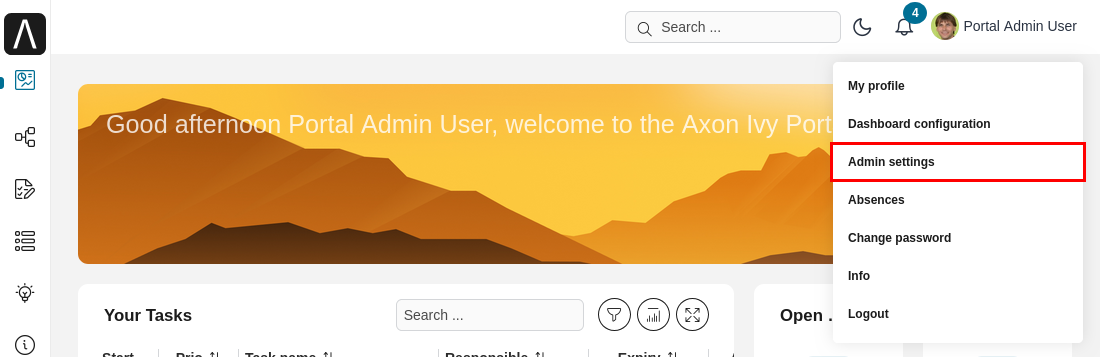
管理者設定 ユーザーメニュー項目を選択します。
ハウツー:サードパーティーのアプリケーションを追加する
アプリケーション タブを選択します。
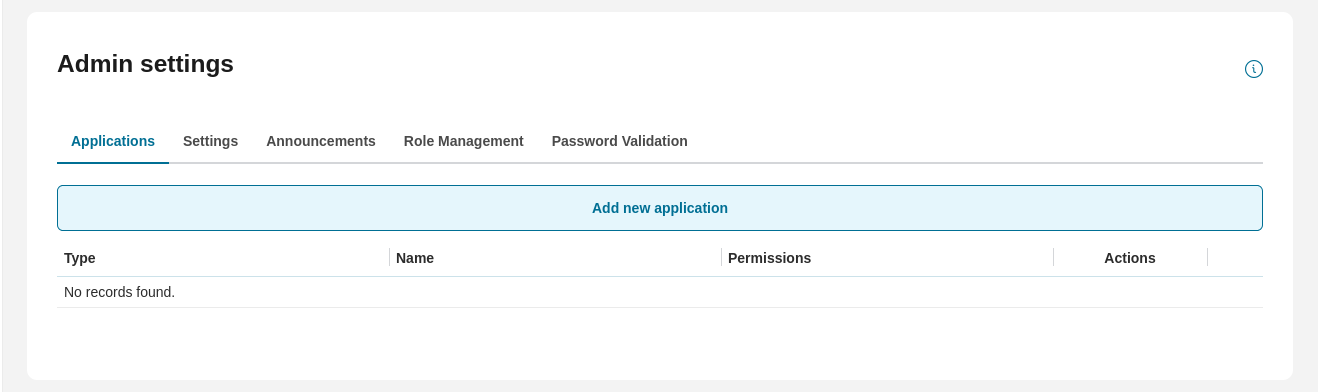
新規 をクリックして、新しいサードパーティーのアプリケーションを追加します。 新しいサードパーティーのアプリケーションを追加 ダイアログが表示されます。
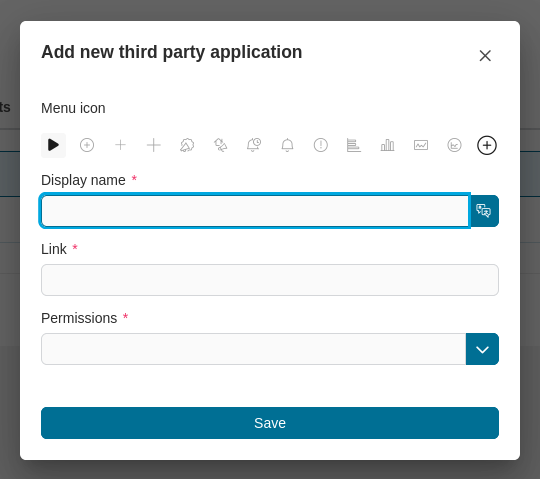
メニューアイコンを変更するには、 変更 をクリックします。
表示名 を入力し、追加言語での表示名を指定します。 言語の追加 をクリックします。
リンク に URL を入力します(http://www.google.com など)。
保存 をクリックします。
ハウツー:ポータル設定を更新する
設定 タブを選択します。利用可能なすべての設定とデフォルト値、説明が表に表示されます。
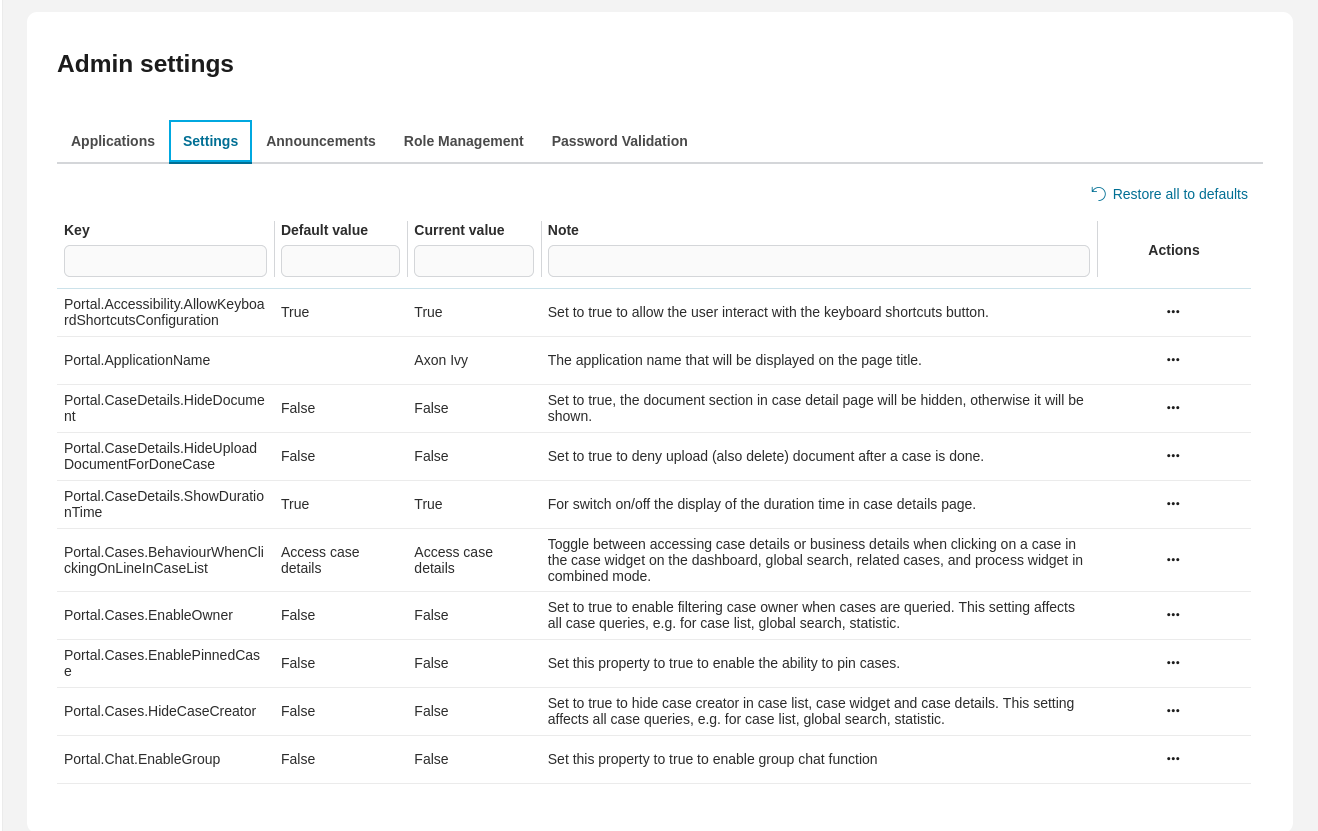
ポータル設定の変数の値を更新するには、
 アイコンをクリックします。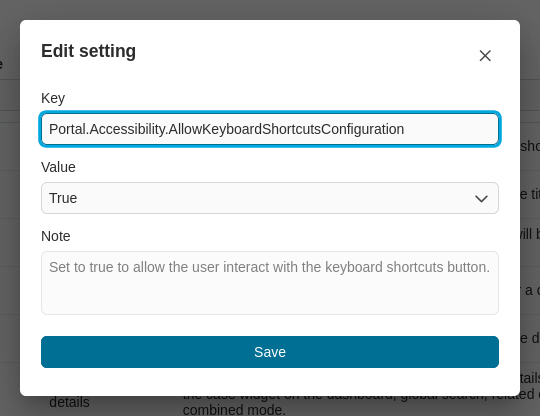
設定をデフォルト値にリセットするには、
 アイコンをクリックします。
すべての設定をデフォルト値にリセットするには、すべて初期値に戻す をクリックします。
Hint
ポータル設定は Axon Ivy の変数として格納され、Axon Ivy コックピット で設定できます。
利用可能な設定
Key |
Default value |
Note |
|---|---|---|
Portal.ApplicationName |
Axon Ivy |
The default application name that will be displayed on the page title. |
Portal.CaseDetails.HideDocument |
FALSE |
Set to true, the document section in case detail page will be hidden, otherwise it will be shown. |
Portal.CaseDetails.HideUploadDocumentForDoneCase |
FALSE |
Set to true to deny upload (also delete) document after a case is done. |
Portal.CaseDetails.ShowDurationTime |
TRUE |
For switch on/off the display of the duration time in case details page. |
Portal.Cases.EnableOwner |
FALSE |
Set to true to enable filtering case owner when cases are queried. This setting affects all case
queries e.g. for case widget, global search.
|
Portal.Cases.HideCaseCreator |
FALSE |
Set to true to hide case creator in case widget, case widget and case details. This setting affects all case queries, e.g. for case widget, global search. |
Portal.Chat.EnableGroup |
FALSE |
Set this property to true to enable group chat function. |
Portal.Chat.EnablePrivate |
FALSE |
Set this property to true to enable private chat function. |
Portal.Chat.MaxConnection |
3 |
The set number controls the amount of tabs allowed with active chat. If more tabs are opened,
the chat will be disabled in inactive tabs. Allowed values are 1 to 5.
|
Portal.Chat.ResponseTimeout |
0 |
Chat response timeout in seconds, default value is 0 and means no timeout. If chat messages go through
the reverse proxy Nginx, chat response timeout must be less than the Nginx timeout, e.g. less than 60 seconds.
|
Portal.DateTimeFormat.DateFilterWithTime |
FALSE |
Set to true to enable date filtering with time. This setting affects task widget and case widget. |
Portal.DateTimeFormat.HideTime |
FALSE |
Set to true to hide hours and minutes next to date. |
Portal.DateTimeFormat.HideYear |
FALSE |
Set to true, year will be hidden, otherwise it will be shown. |
Portal.DisplayMessageAfterFinishTask |
TRUE |
A feedback message will be displayed after user finishes or leaves a task. |
Portal.DisplayUsersOfRole |
FALSE |
Controls the SecurityMemberDisplayName component.| If true and the SecurityMember is a role, lists all users of this role under the info icon besides the role name.
|
Portal.Document.EnableScriptChecking |
FALSE |
If true, enables checking uploaded documents for scripting. Supports PDF, Excel, Word. |
Portal.Document.EnableVirusScanner |
FALSE |
Set to true to enable virus scanner for uploaded document. Currently this function uses the VIRUSTOTAL API. |
Portal.Document.WhitelistExtension |
doc, docx, xls,
xlsx, xlsm, csv,
pdf, ppt, pptx,
txt, zip, jpg,
jpeg, bmp, png
|
Leave value empty if you allow all extensions. If you allow just some extensions, list out these extensions here,
separated by comma. Example: pdf, txt, doc, docx.
|
Portal.EmbedInFrame |
TRUE |
If true, start a process/task in IFrame mode. |
Portal.Histories.HideSystemNotes |
TRUE |
If true, case/task note does not display any system notes for non-administrator users. |
Portal.Histories.HideSystemNotesForAdministrator |
FALSE |
If true, case/task note does not display any system notes for administrator. |
Portal.Histories.HideSystemTasks |
TRUE |
If true, case note does not display any system tasks for non-administrator users. |
Portal.Histories.HideSystemTasksForAdministrator |
FALSE |
If true, case note does not display any system tasks for administrator. |
Portal.Homepage |
Dashboard |
Define the standard homepage which will be redirected to when clicking on home icon or logo.
This setting also applies to the end page for finished tasks.
|
Portal.LoggedInUserFormat |
Display name |
The option to show logged-in user format. |
Portal.Processes.DefaultImage |
DEFAULT |
The standard setting of default image that will be displayed in the image process list. |
Portal.Processes.Mode |
Image |
The standard setting of view mode in the process list. |
Portal.Processes.ShowInformation |
TRUE |
Set to false to disable link to Show Information of process on Processes page (grid mode) and Case Details. |
Portal.ShowButtonIcon |
TRUE |
If true, show icons in buttons. |
Portal.ShowGlobalSearch |
TRUE |
If true, display the global search box. |
Portal.TaskDetails.HideDocument |
FALSE |
If true, the document section in task detail page will be hidden, otherwise it will be shown. |
Portal.TaskDetails.ShowDurationTime |
TRUE |
For switch on/off the display of the duration time in task details page. |
Portal.Tasks.BehaviourWhenClickingOnLineInTaskList |
Run the task |
Default behaviors (run the task or access task details) when clicking.
on a line in the task widget, task widget of the dashboard or on related tasks in the case details page.
|
Portal.Cases.BehaviourWhenClickingOnLineInCaseList |
Access case details |
Toggle between accessing case details or business details when clicking
on a case in the case widget on the dashboard, global search, related cases, and process widget in combined mode.
|
Portal.UserMenu.HideChangePasswordMenu |
FALSE |
Set this variable to true to hide the “Change Password” option in the top menu and the “Forgotten Password” option on the login page. If set to false, these options will be shown. |
Portal.UserMenu.HideLogoutMenu |
FALSE |
If true, the logout button on top menu will be hidden, otherwise it will be shown. |
Portal.ProcessViewer |
TRUE |
Set this property to true to display process viewer option in Task/Case actions. If a process is designed to not allow users to view it, the option in related Task/Case actions will be hidden. |
Portal.Histories.HideRelatedCaseInfo |
FALSE |
If true, case history does not display the related case information in the history table. |
Portal.ShowErrorLogToConsole |
FALSE |
If true, write error log to browser console. |
Portal.ShowAvatar |
TRUE |
If true, switch on the display of user/role avatars. |
Portal.RoleDirectChildrenLimit |
50 |
Controls the number of direct child roles that are shown in the Role Management tab.
Valid numbers: 10, 50, 100.
|
Portal.RoleParentLimit |
10 |
Controls the number of parent roles that are shown when filtering roles in the Role Management tab.
Valid numbers: 5, 10, 20.
|
Portal.LoginPage.ShowFooter |
TRUE |
Set to false to hide the footer on the login page. |
Portal.Theme.EnableSwitchThemeModeButton |
TRUE |
If false, the Switch Theme Mode button is disabled. |
Portal.Theme.Mode |
LIGHT |
The default theme mode of the application. |
Portal.SearchScope.ByCaseFields |
NAME, DESCRIPTION, CUSTOM |
Defining the fields that the global search will use to find matching cases beside case Id (this can influence the performance of the search). |
Portal.SearchScope.ByTaskFields |
NAME, DESCRIPTION |
Defining the fields that the global search will use to find matching tasks beside task Id (this can influence the performance of the search). |
Portal.GlobalFooterInfo |
Defining the global environment footer info. |
|
Portal.DeepL.AuthKey |
DeepL Authentication Key (should end with :fx) |
|
Portal.DeepL.Enable |
FALSE |
Set this property to true to enable the DeepL translation support. |
Portal.ShowQuickGlobalSearch |
TRUE |
For switch on/off the display of the quick global search. |
Portal.UserMenu.ShowQRCode |
FALSE |
For switch on/off the display of the QR code. |
Portal.UserMenu.BaseQRCodeUrl |
Set Base URL for QR code to display. |
|
Portal.UserMenu.AppleStoreURL |
Set URL to download Axon Ivy mobile app on Apple Store. |
|
Portal.UserMenu.GooglePlayURL |
Set URL to download Axon Ivy mobile app on Google Play. |
|
Portal.GlobalSearchScopeCategories |
PROCESSES,TASKS,CASES |
Defining the types that the global search will search for. |
ハウツー:通知の表示/非表示を切り替える
通知 タブを選択します。
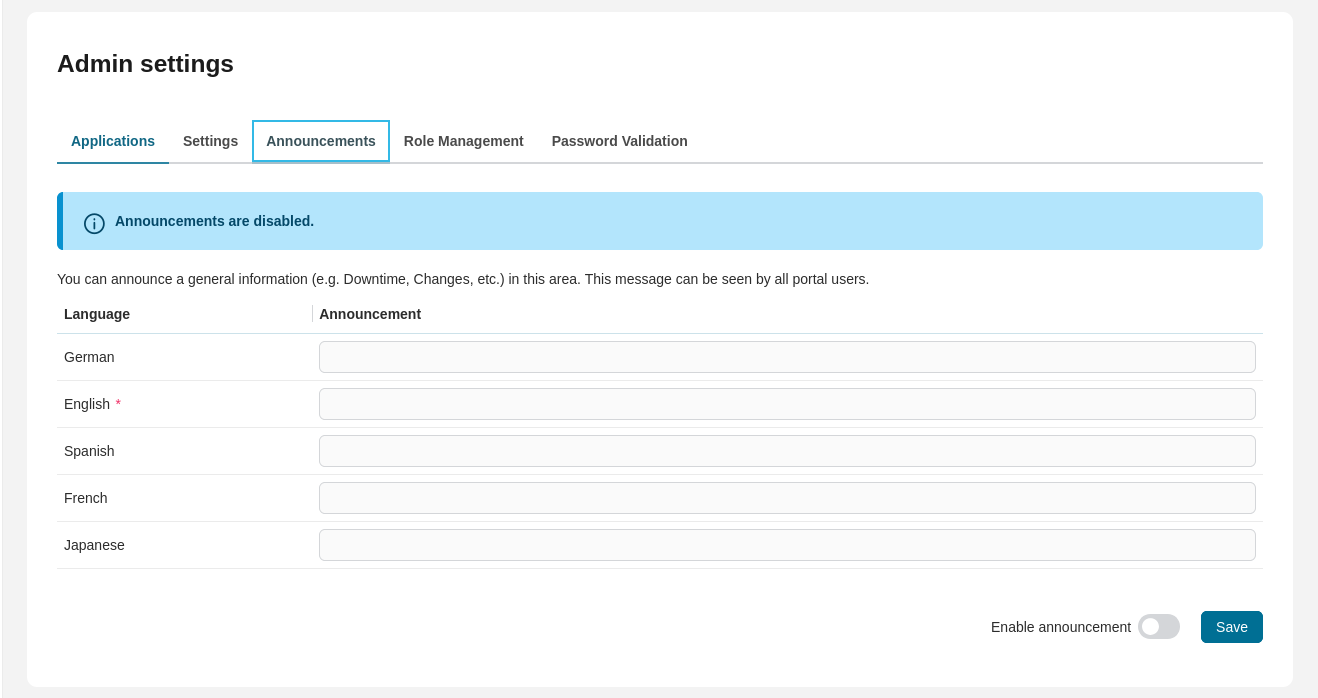
通知テキストを入力し、保存 ボタンをクリックします
通知の有効化 オプションをオンにして、通知を表示します。
通知の有効化 オプションをオフにして、通知を非表示にします。
ハウツー:ロールを管理する
ポータルの 管理者設定 領域にある ロールの管理 セクションで、ロールを管理できます。
🔑RoleCreate:新しい動的ロールを作成
🔑RoleDelete:動的ロールを削除
🔑RoleMove:新しいロールを作成する ステップで親ロールを選択できます。デフォルトでは、システムは
Everybodyを使用します。
ロールの管理 タブを選択します。
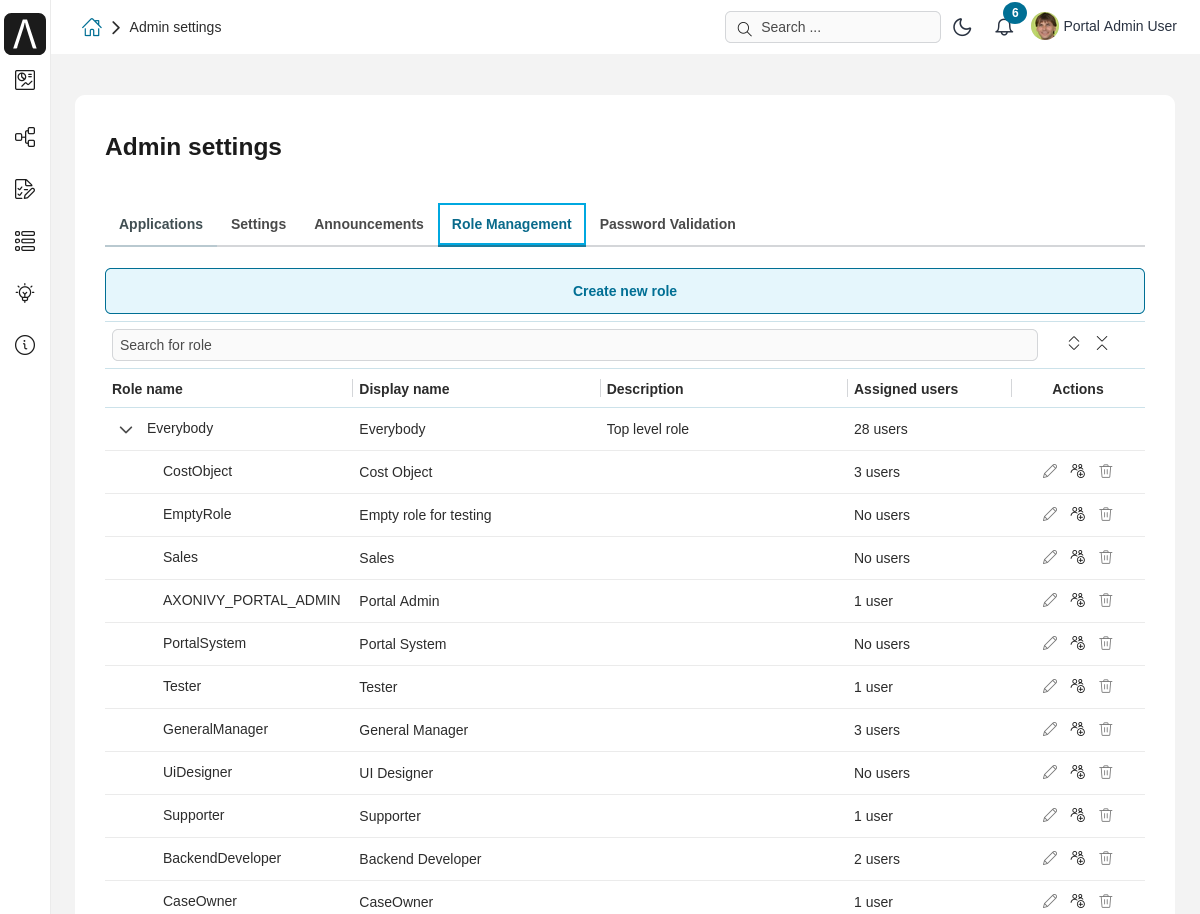
新しいロールを作成する ボタンをクリックし、データを入力します。
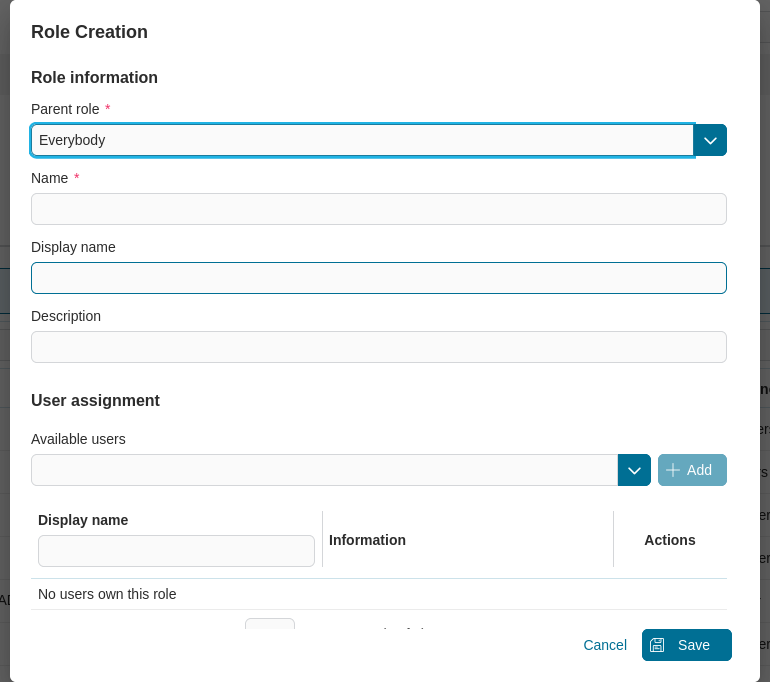
すべての必須フィールドにデータを入力した後、 保存 ボタンをクリックして、ロールを作成します。
ロールツリーテーブルに新しいロールが表示されます。
ユーザーは、ロールのプロパティを編集し、ユーザーをロールに割り当て、 アクション 列にあるアクションを使用してロールを削除し、新しいロールを管理できます。
Note
ポータルには、 ロールの管理 タブに表示されるロールの数を制御する 2 つの詳細設定も用意されています。 詳細については、 設定の変数 を参照してください。
ハウツー:パスワード検証を有効/無効にする
ポータルの 管理者設定 領域にある パスワード検証 セクションで、パスワード検証を有効/無効にし、パスワードポリシーを変更できます。 ポータルの 管理者設定 領域にある パスワード検証 セクションで、パスワード検証を有効/無効にし、パスワードポリシーを変更できます。
パスワード検証 タブを選択します。
パスワード検証 タブを選択します。
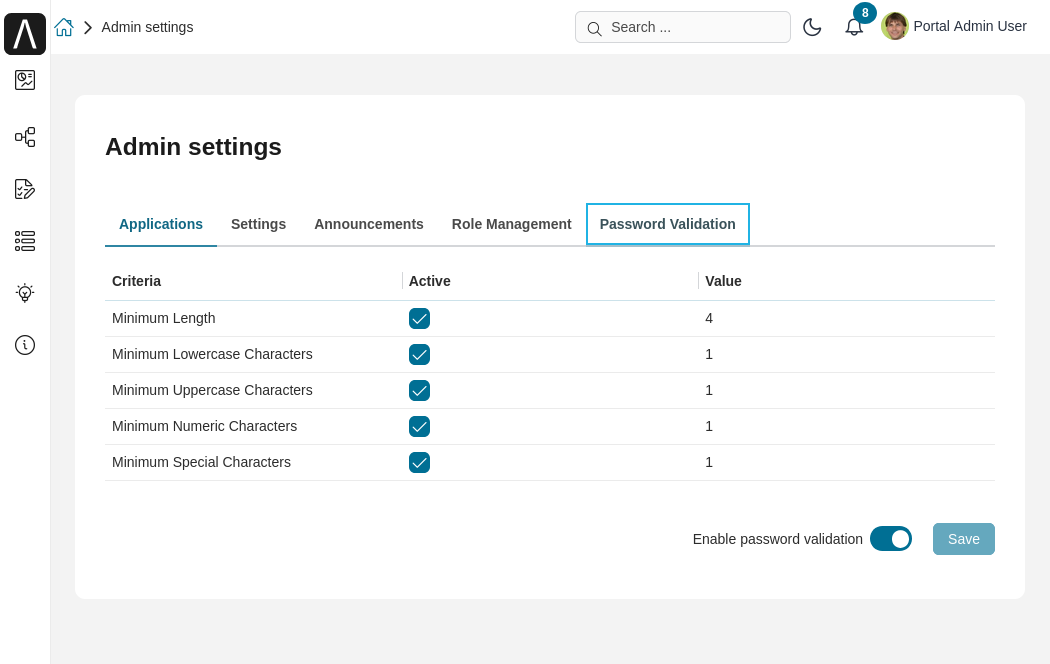
パスワード検証の有効化 トグルスイッチをクリックして、機能を有効/無効にします。
パスワード検証の有効化 トグルスイッチが 有効 の場合、パスワードポリシーをアクティブ化/非アクティブ化し、パスワードポリシーの設定を変更し、 保存 ボタンをクリックして設定を保存できます。
設定を保存した後、パスワードを変更するか、パスワードをリセットして検証できます。