ロールの選択
概要
このコンポーネントは、ロールのリストからロールを選択するのに使用します。ロールのリストを定義していない場合は、すべてのロールがロードされます。 コンポーネントには、1 つのラベル、1 つのオートコンプリート、このオートコンプリート要素に関連するメッセージを表示する 1 つのメッセージ要素が含まれます。
使用方法
このコンポーネントは任意のページに挿入できます。以下の 2 つのスタイルでラベルを表示します。
デフォルトのスタイル
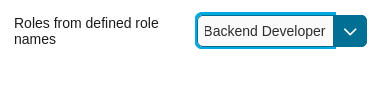
コードの例:
<ic:com.axonivy.portal.components.RoleSelection
   componentId="role-from-defined-role-autocomplete"
   fromRoleNames="#{data.definedRoleNames}"
   selectedRole="#{data.selectedRoleForDefinedRoles}"
   isRequired="true"
   label="Roles from defined role names"/>
フローティングラベル
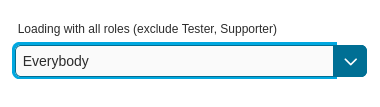
コードの例:
<ic:com.axonivy.portal.components.RoleSelection
   componentId="floating-label-and-exclude-role-autocomplete" hightlight="false"
   selectedRole="#{data.selectedRole}"
   label="Loading with all roles (exclude CaseOwner, GeneralManager)"
   excludedRolenames="#{data.excludedRoleNames}"
   isRequired="true" floatingLabel="true" />
Tip
ロールの選択コンポーネントのオートコンプリート要素を使用して、子イベントや Ajax イベントを挿入できます( RoleSelection.xhtml を参照)。
RoleSelection コンポーネントの任意の子は、 insertChildren タグの位置にあるこのオートコンプリートにリペアレントされます。
また、Ajax イベントを入れ子にできるように、 event という名前のオートコンプリートのファセットを導入しました。
例:
「<表示名> (<メンバー名>)」という形式のドロップダウンリストでロールを表示します。 ロールを選択すると、メッセージが表示されます。
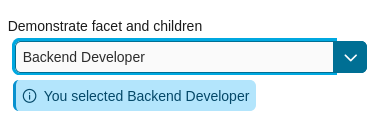
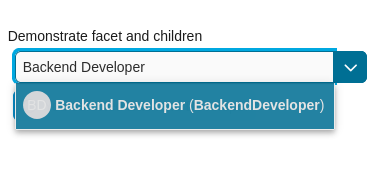
<ic:com.axonivy.portal.components.RoleSelection
   id="item-select-event-component"
   componentId="item-select-event-for-role-selection"
   fromRoleNames="#{data.definedRoleNames}"
   selectedRole="#{data.selectedRoleForInsertChildren}"
   label="Demonstrate facet and children"
   autoCompleteStyleClass="width-100"
   autoCompletePanelStyleClass="ui-g-12 floating-label-margin-top"
   isRequired="true" floatingLabel="true" hasCustomizedSelectionList="true">
   <p:column>
      <pc:securityMemberNameAndAvatar displayName="#{role.getDisplayName()} (#{role.getMemberName()})" securityMember="#{role}" isStandAlone="false" />
   </p:column>
   <f:facet name="event">
      <p:ajax event="itemSelect" listener="#{logic.showSelectedRole}"
         update="#{p:component('item-select-event-for-role-selection-message')}" />
   </f:facet>
</ic:com.axonivy.portal.components.RoleSelection>
詳細については、 portal-components-examples プロジェクトの RoleSelectionExample.xhtml を参照してください。
このコンポーネントには以下の属性が用意されています。
Name |
Default |
Type |
Description |
|---|---|---|---|
fromRoleNames |
null |
List<String> |
Child Role list will be loaded based on this list. If empty, all roles will be loaded. |
componentId |
role-selection |
String |
Id of role autocomplete. |
selectedRole |
null |
RoleDTO |
Required input and output value for selected role. |
excludedRolenames |
null |
List<String> |
Roles to be excluded from role selection. Applied if you use default completeMethod. |
requiredMessage |
This field is required |
String |
Message to be displayed when role autocomplete validation fails. |
forceSelection |
true |
Boolean |
If true, only accept roles from the given list. |
minQueryLength |
1 |
Boolean |
Number of characters to be typed before starting to offer autocomplete. |
completeMethod |
completeRole |
Method Expression |
Method for role autocomplete. |
isDisabled |
false |
Boolean |
If true, Role Selection is disabled. |
isRequired |
false |
Boolean |
If true, Marks Role Selection is required. |
isReadOnly |
false |
Boolean |
If true, user cannot change role. |
isRenderedMessage |
true |
Boolean |
Specify the rendering of message for role field. |
hightlight |
true |
Boolean |
Highlights the first suggested role automatically. |
floatingLabel |
false |
Boolean |
If true, display label with floating style and labelPanelStyleClass can’t be applied. |
autocompleteStyleClass |
null |
String |
Style class of role autocomplete. |
autoCompletePanelStyleClass |
null |
String |
Style class of role autocomplete panel. |
inputStyleClass |
null |
String |
Style class of role autocomplete input. |
labelPanelStyleClass |
null |
String |
Style class of label panel. |
labelStyleClass |
null |
String |
Style class of label. |
label |
null |
String |
Text of label for role selection component. |
size |
null |
Integer |
Number of characters. usesed to determine the width of the input element. |
messageStyleClass |
null |
String |
Message style class. |
itemLabel |
displayName |
String |
Displayed text of selected role and roles in dropdown list. |
cache |
true |
Boolean |
If true, autocomplete caches the search result list. |
moreText |
More… |
String |
The text shown in panel when the suggested list is greater than maxResults. |
queryDelay |
300 |
Integer |
Delay in milliseconds before sending a query to the server. |
maxResults |
100 |
Integer |
Maximum number of results to be displayed. |
scrollHeight |
400 |
Integer |
scrollHeight attribute of primefaces autocomplete. |
hasCustomizedSelectionList |
false |
Boolean |
If true, the customized selection list is displayed. |
isShowAvatarInSelectionList |
Boolean |
Boolean value to specify avatar showing. Set to true to show avatar.
The setting will detect Portal setting Portal.ShowAvatar as its default value, refer to HowTo: Update HowTo: Update Portal Settings for more details.
If the Portal setting is not available, defaults to true.
|
|
displayNameRenderedInSelectionList |
true |
Boolean |
If false, the name of security member in the selection list is hidden. |
displayNameInSelectionListStyleClass |
null |
String |
Style class of display name in the selection list |
selectionListContainerStyleClass |
null |
String |
Style class of item’s container in the selection list |
emptyMessage |
No results |
String |
Message to show when there’s no option in selection list. |
非推奨のロールの選択からの移行
HTML ファイルのコードを置き換えます。
ic:ch.ivy.addon.portalkit.component.RoleSelectionをic:com.axonivy.portal.components.RoleSelectionに置き換えてください。ch.ivy.addon.portalkit.dto.RoleDTOをcom.axonivy.portal.components.dto.RoleDTOに置き換えます。Note
データベースに
ch.ivy.addon.portalkit.dto.RoleDTOクラスを格納した場合は、データベースを手動で更新する必要があります。