Document Table
This component is a case document table with functions display, upload, preview, download and delete document entries.
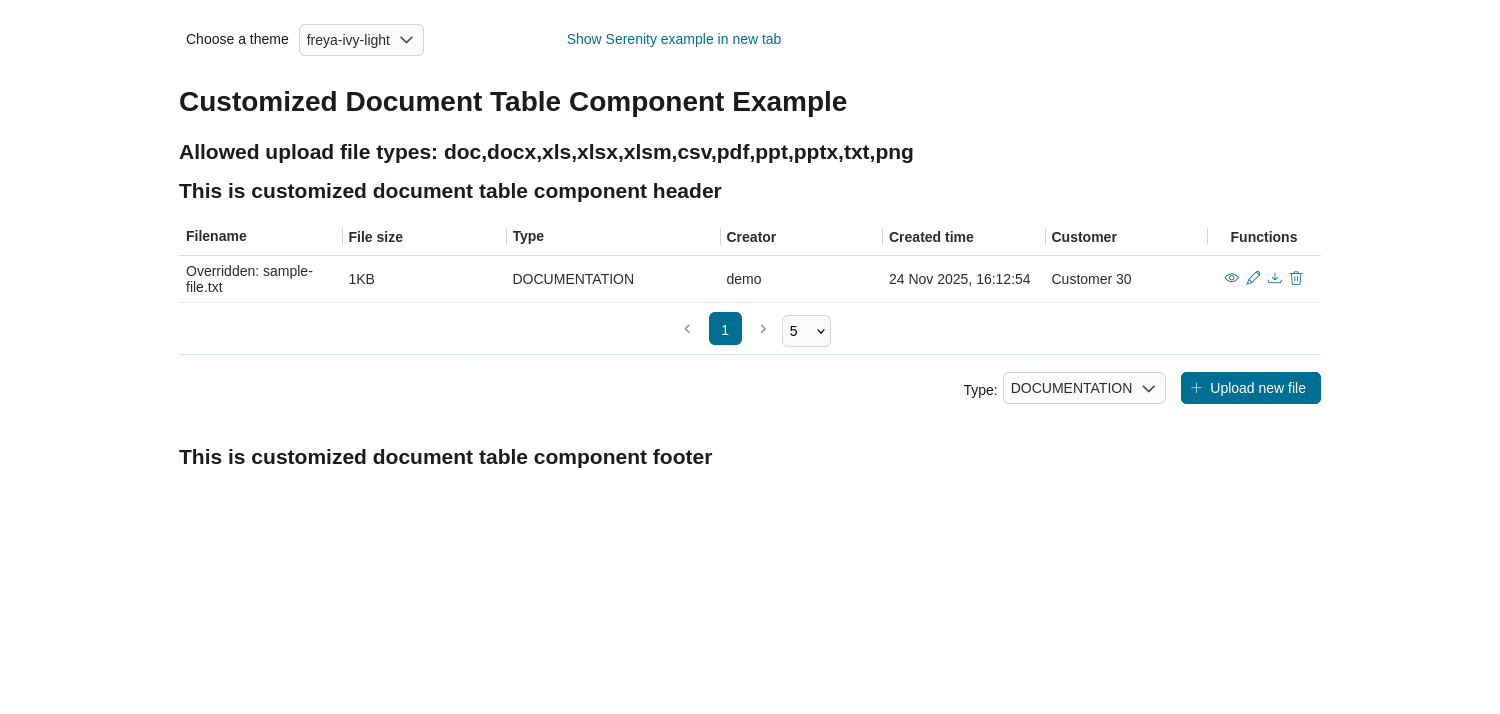
Attributes
Name |
Default |
Type |
Description |
|---|---|---|---|
nameColumnRendered |
TRUE |
Boolean |
Boolean value to specify the rendering of the name column, when set to false name column will not be rendered. |
sizeColumnRendered |
TRUE |
Boolean |
Boolean value to specify the rendering of the size column, when set to false size column will not be rendered. |
typeColumnRendered |
TRUE |
Boolean |
Boolean value to specify the rendering of the type column, when set to false type column will not be rendered. |
functionColumnRendered |
TRUE |
Boolean |
Boolean value to specify the rendering of the function column, when set to false function column will not be rendered. |
previewRendered |
TRUE |
Boolean |
Boolean value to specify the rendering of the preview icon, when set to false preview icon will not be rendered. |
uploadRendered |
TRUE |
Boolean |
Boolean value to specify the rendering of the upload icon, when set to false upload icon will not be rendered. |
downloadRendered |
TRUE |
Boolean |
Boolean value to specify the rendering of the download icon, when set to false download icon will not be rendered. |
deleteRendered |
TRUE |
Boolean |
Boolean value to specify the rendering of the delete icon, when set to false delete icon will not be rendered. |
renameRendered |
TRUE |
Boolean |
Boolean value to specify the rendering of the edit filename icon, when set to false the icon will not be rendered. |
messageRendered |
TRUE |
Boolean |
Boolean value to specify the rendering of the message, when set to false message will not be rendered. |
lazy |
FALSE |
Boolean |
Boolean value to specify whether the table should load data lazily and enable pagination. |
fileLimit |
-1 |
Integer |
Number of files are in the given ICase. |
sizeLimit |
null |
Long |
Individual uploading file size limit in bytes. |
updatedComponentAfterUploaded |
null |
String |
Component will be triggered the update after document is uploaded. |
previewIcon |
fa-eye |
String |
Icon class will be displayed in preview dialog. |
previewStyleClass |
null |
String |
Styles for preview link. |
previewpreviewDialogStyleClass |
null |
String |
Styles for preview dialog. |
previewPDFStyleClass |
null |
String |
Styles for PDF preview dialog. |
previewImageStyleClass |
null |
String |
Styles for image preview dialog. |
downloadIcon |
fa-download |
String |
Icon class will be displayed in download link. |
downloadStyleClass |
null |
String |
Styles for download link. |
deleteIcon |
fa-trash-o |
String |
Icon class will be displayed in delete link. |
deleteStyleClass |
null |
String |
Styles for delete link. |
updatedComponentAfterDeleted |
null |
String |
Component will be triggered the update after document is deleted. |
renameStyleClass |
null |
String |
Styles for edit filename link. |
updatedComponentAfterRenamed |
null |
String |
Component will be triggered the update after document is renamed. |
selectedType |
String |
String value to specify the selected document types, by default it will be first element in |
|
typeSelectionItems |
DOCUMENTATION,CONTRACT,INFORMATION,EMAIL,OTHERS |
String |
String value to specify the list of document type. |
enableScriptCheckingForUploadedDocument |
Boolean |
Boolean value to specify script checking. Set to
true to enable script checking.The setting will detect Portal setting
Portal.Document.EnableScriptChecking as its default value, refer to HowTo: Update Portal Settings for more details.If the Portal setting is not available, defaults to
false. |
|
enableVirusScannerForUploadedDocument |
Boolean |
Boolean value to specify virus scanning. Set to
true to enable virus scanning. Refer to Virus Scanning Setting for more details.The setting will detect Portal setting
Portal.Document.EnableVirusScanner as its default value, refer to HowTo: Update Portal Settings for more details.If Portal setting is not available, default value is
false. |
|
allowedUploadFileTypes |
String |
String value to specify the list of file extension that can be uploaded.
The setting will detect Portal setting
Portal.Document.WhitelistExtension as its default value, refer to HowTo: Update Portal Settings for more details.If Portal setting is not available, default value is
doc,docx,xls,xlsx,xlsm,csv,pdf,ppt,pptx,txt,zip,jpg,jpeg,bmp,png. |
Virus scanning
The Document Table has options to check for harmful scripts and viruses inside the file before uploading it to the system.
Set
enableScriptCheckingForUploadedDocumenttotrueto check for harmful scripts.Set
enableVirusScannerForUploadedDocumenttotrueto enable virus scanning.
Code example:
<ic:com.axonivy.portal.components.DocumentTable id="document-table-component"
   enableScriptCheckingForUploadedDocument="true"
   enableVirusScannerForUploadedDocument="true" />
Please refer to Virus Scanning Settings for more details about virus scanning.
Customize
In your project, create callable subprocesses with the information below to customize the functions of the Document Table.
Tip
You can refer to process CustomDocumentFeatures in project portal-components-examples
to examine how to customize.
Get document list
To customize how Document Table gets documents, create a callable subprocess with:
Signature: portalGetDocumentItems
Parameters:
businessCase(ch.ivyteam.ivy.workflow.ICase)The case for which to retrieve documents.
Result:
documents(java.util.List<com.axonivy.portal.components.ivydata.bo.IvyDocument>)List of documents associated with the case. After retrieving documents from your DMS, convert them into this type with mandatory fields:
id,uuid,name,contentType.message(java.lang.String)Status or error message from the document retrieval operation.
Upload document
To customize what Document Table should do when a user uploads a document, create a callable subprocess with:
Signature: portalUploadDocumentItem
Parameters:
businessCase(ch.ivyteam.ivy.workflow.ICase)The case to upload the document to.
uploadedFile(org.primefaces.model.file.UploadedFile)The file being uploaded by the user.
enableScriptCheckingForUploadedDocument(java.lang.Boolean)Whether to check uploaded files for embedded scripts.
enableVirusScannerForUploadedDocument(java.lang.Boolean)Whether to scan uploaded files for viruses.
allowedUploadFileTypes(java.lang.String)Comma-separated list of allowed file extensions.
Result:
uploadedDocument(ch.ivyteam.ivy.workflow.document.IDocument)The uploaded document object.
message(java.lang.String)Status or error message from the upload operation.
status(java.lang.String)Operation status: OK or FAIL.
Download document
To customize behavior when a user downloads a document from Document Table, create a callable subprocess with:
Signature: portalDownloadDocumentItem
Parameters:
businessCase(ch.ivyteam.ivy.workflow.ICase)The case containing the document.
document(com.axonivy.portal.components.ivydata.bo.IvyDocument)The document to be downloaded.
Result:
streamedContent(org.primefaces.model.StreamedContent)The document content stream for download.
Delete document
To customize behavior when a user deletes a document from Document Table, create a callable subprocess with:
Signature: portalDeleteDocumentItem
Parameters:
businessCase(ch.ivyteam.ivy.workflow.ICase)The case containing the document.
document(com.axonivy.portal.components.ivydata.bo.IvyDocument)The document to be deleted.
Result:
message(java.lang.String)Status or error message from the delete operation.
Rename document
To customize behavior when a user rename a document from Document Table, create a callable subprocess with:
Signature: portalRenameDocumentItem
Parameters:
businessCase(ch.ivyteam.ivy.workflow.ICase)The case containing the document.
document(com.axonivy.portal.components.ivydata.bo.IvyDocument)The document to be renamed. The new filename should already be modified in the document’s name attribute.
Result:
message(java.lang.String)Message to inform the user that their new filename is successfully updated or invalid to use.
isSuccess(java.lang.Boolean)trueif the document’s name is successfully updated, otherwisefalse.status(java.lang.String)Operation status: OK or SKIP (if customized process skipped updating the filename).
User interface
Not only the functions, but you can also customize the UI of the Document Table such as adding a new column, removing default columns or enable the lazy loading and pagination.
Code Example:
<h:form id="form">
   <ic:com.axonivy.portal.components.DocumentTable id="document-table-component"
      allowedUploadFileTypes="doc,docx,xls,xlsx,xlsm,csv,pdf,ppt,pptx,txt,png"
      typeSelectionItems="#{documentTableExampleBean.documentTypes}"
      lazy="true">
      <f:facet name="componentHeader">
         <h2>This is the customized document table component header</h2>
      </f:facet>
      <p:column headerText="Creator" styleClass="document-creator-column">
         <h:outputText id="creator" value="#{document.creation.userName}" title="#{document.creation.userName}" />
      </p:column>
      <p:column headerText="Created time" styleClass="document-created-column">
         <h:outputText id="created-time" value="#{document.creation.timestamp}" title="#{document.creation.timestamp}" />
      </p:column>
      <p:column headerText="Customer" styleClass="document-customer-column">
         <h:outputText id="customer" value="#{document.customer}" title="#{document.customer}" />
      </p:column>
      <f:facet name="componentFooter">
         <h2>This is the customized document table component footer</h2>
      </f:facet>
   </ic:com.axonivy.portal.components.DocumentTable>
</h:form>
Tip
Refer to process DocumentTableExample in project portal-components-examples for more details.
Migration Notes
Migrate 10.0.x to 10.0.12
Since this version, we no longer support the override process approach for functions of Document Table. Please follow our guidelines below to migrate your override subprocesses.
Remove Subprocess Override of
GetDocumentItems,UploadDocumentItem,DeleteDocumentItem, andDownloadDocumentItemfrom your project.Change the signature of your callable starts as described below.
Subprocess
New signature
GetDocumentItems
portalGetDocumentItems
UploadDocumentItem
portalUploadDocumentItem
DeleteDocumentItem
portalDownloadDocumentItem
DownloadDocumentItem
portalDeleteDocumentItem
Now your Document Table should work as before.
Migrate to 10.0.0
Replace code in HTML files: replace
ic:ch.ivy.addon.portalkit.component.document.DocumentTablewithic:com.axonivy.portal.components.DocumentTable.Consider updating value of the new attributes
enableScriptCheckingForUploadedDocument,enableVirusScannerForUploadedDocumentandallowedUploadFileTypesas required.Override subprocesses if you want and adapt your business accordingly.
New subprocess
Deprecated subprocess
GetDocumentItems
GetDocumentList
UploadDocumentItem
UploadDocument
DeleteDocumentItem
DeleteDocument
DownloadDocumentItem
DownloadDocument
If you have customized IvyDocument make sure to extend it from class
com.axonivy.portal.components.ivydata.bo.IvyDocument.Attributes
typeSelectionItemsandselectedTypenow usecom.axonivy.portal.components.enums.DocumentType. Please replacech.ivy.addon.portalkit.enums.DocumentTypewithcom.axonivy.portal.components.enums.DocumentType.Note
Please remove redundant overridden configurations, subprocesses, and data classes such as GetDocumentListOverride, UploadDocumentOverride, etc.
Release Notes
Changes in 12.0.9
Introduced Renaming Document feature for Document Table component. Follow instructions in Customize section to create a callable subprocess to customize the renaming behavior if needed.
Enhanced the document preview feature for the task and case detail. If you have DocFactory in the same security context, you can preview Word(doc, docx), Excel(xls, xlsx) and email(eml) documents.
Changes in 12.0.11
Added lazy loading functionality to the Document Table component, enabling efficient data loading through pagination.
Changes in 12.0.14
It supports multiple file uploads and drag-and-drop. Click the Upload new file button to open the upload dialog, then select files via “Browse files” or drag them directly into the dialog’s drop zone.