Logo

Portal

  • User Guide
  • Developer Guide
    • Introduction
    • Architecture
    • Installation
    • Settings
    • Portal Dashboard
    • User Menu
    • Components
    • IFrame In Portal
    • Customization
      • Build Your Own Portal (Deprecated)
      • Portal Styles Customization (Logos, Colors, Date Patterns)
      • Login (Deprecated)
      • Forgot Password
      • Menu And Default Homepage In User Profile
      • Legacy Portal Home (Deprecated)
      • Task widget (Deprecated)
      • Task Delegation
      • Task item details
      • Case Widget (Deprecated)
      • Case Item Details
      • Default User Process
      • Default Chart
      • Default Statistic Custom Field (Deprecated)
      • Default Chart Color
      • Change Password Process
      • Logout Process
      • Express end page (Deprecated)
      • Express External Data Provider (Deprecated)
      • Navigate Back
      • Hide Technical Stuff
      • Business Details Page
      • Global Search Result (Deprecated)
      • Document processes
      • Responsive CSS (Deprecated)
      • Global Footer Info (Deprecated)
      • Page Header And Footer
      • Process Information (Deprecated)
      • Process Image
    • Troubleshooting
    • Permission List
    • Public API
  • Portal Components
Portal Guide
  • Developer Guide
  • Customization
  • Navigate Back

Navigate Back

When a task finishes, the Portal navigates back to the previous page. For example, if a task is started from the homepage, it redirects to the homepage. If a task is started from a task list, it redirects to that task list after the task is finished.

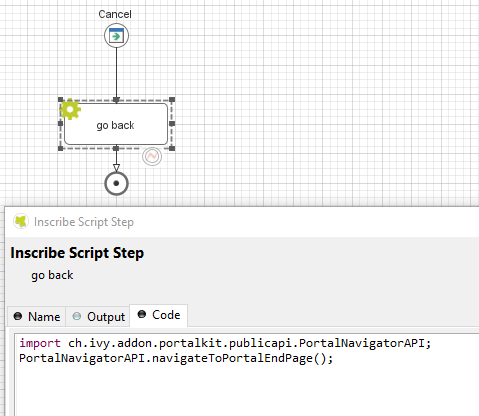
If your project has a navigation button that does not finish a task, e.g Cancel, you have to implement the following:

If using an IFrame:

  • Previous page: call navigateToPortalEndPage() from class PortalNavigatorInFrameAPI.

  • A specific URL: call navigateToUrl(String url) from class PortalNavigatorInFrameAPI.

Warning

Never pass unsanitized, user-controlled input directly as the url parameter. navigateToUrl() internally URL-decodes the value and escapes it for JavaScript context via SanitizeAPI.escapeForJavascript(). However, you should still validate the URL at the application boundary (e.g., check that the scheme is http or https) to prevent open-redirect or protocol-injection attacks.

Without IFrame:

  • Home page: call navigateToPortalHome() from class PortalNavigatorAPI.

  • Previous page: call navigateToPortalEndPage() from class PortalNavigatorAPI.

    navigate-back

Previous Next

© Copyright 2026 Axon Ivy AG.

Version: 10.0 (en)